Marriage Biodata Security: Safe Ways to Share PDFs and Prevent Misuse
Once your biodata leaves your phone, it can be forwarded endlessly. While most families act responsibly, it only takes one careless share for personal data to land in the wrong hands. Here are practical steps to secure your marriage biodata—without making the process inconvenient for genuine prospects.
Identify Common Risks First
- Unlimited forwards: WhatsApp groups and email chains can spread PDFs beyond intended recipients.
- Screenshots & printing: Even password-protected files can be captured via screenshots.
- Data theft: Contact numbers, addresses, or salary details can be misused for scams.
- Unauthorized edits: Someone might copy your content into different templates without permission.
- Public uploads: Open matrimonial forums sometimes reshare biodata files without consent.
Stay updated on digital safety practices through the Indian Computer Emergency Response Team (CERT-In) or the Ministry of Electronics & IT cyber hygiene resources.
Build a Secure Sharing Workflow
- Create a master file inside the MatrimonyBio editor with all finalized information.
- Export a “sharing version” that omits sensitive data (full address, ID numbers).
- Add a watermark (e.g., “For Sharma Family – Sept 2025”) diagonally across each page.
- Protect the PDF with a password before emailing; use unique passwords per family if possible.
- Log distribution: Keep a simple spreadsheet noting who received which version and when.
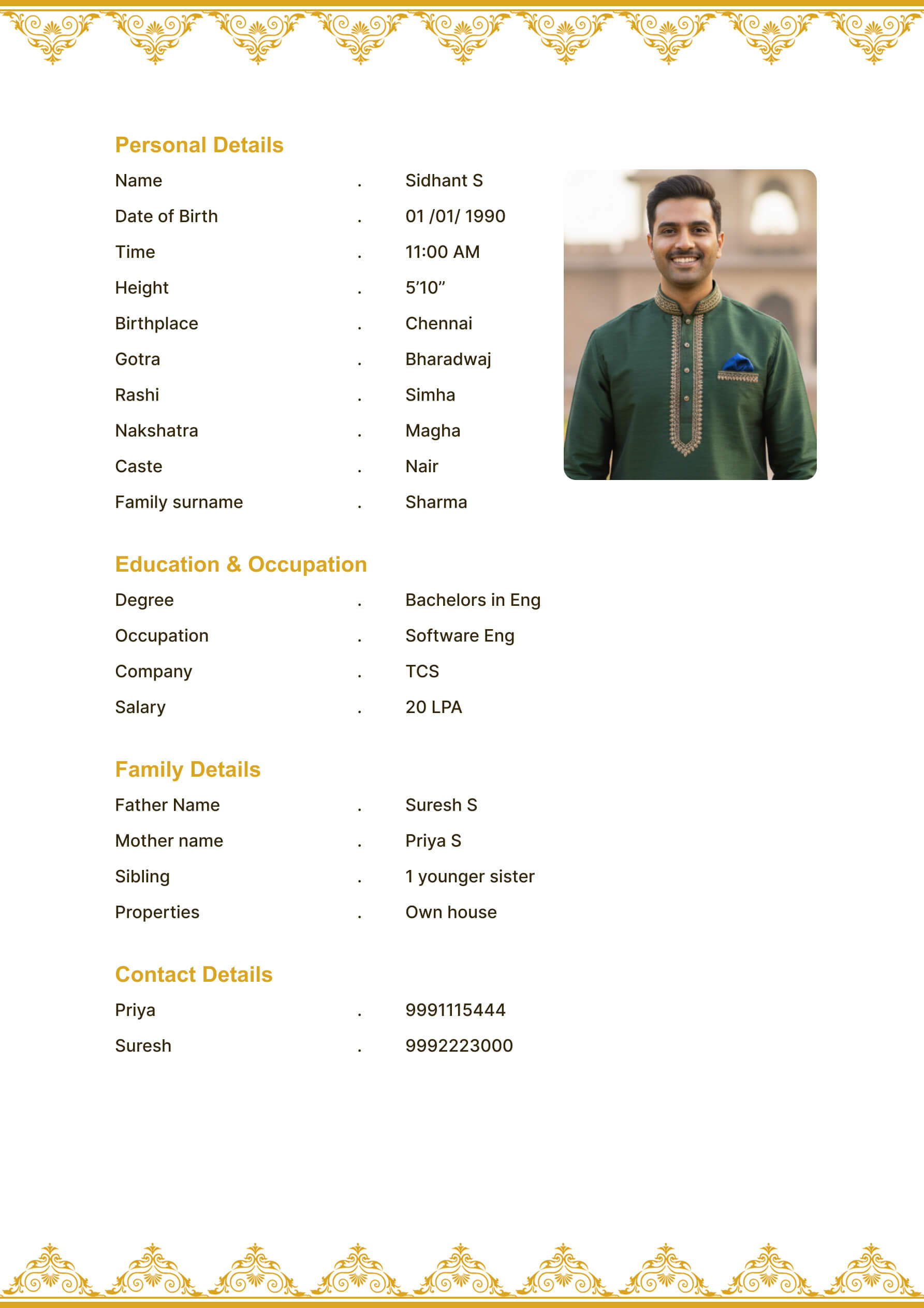 Luxury template preview highlighting clean negative space—perfect for placing recipient-specific watermarks without clutter.
Tools for PDF Protection
- Password protection: Available within many PDF editors and some OS-level print dialogs.
- Watermarking: Use built-in export settings or third-party tools (PDF24, Canva watermark layer).
- Restricted printing: Disable printing in the PDF settings to reduce physical copies.
- Read-only links: Upload to secure cloud storage (Google Drive, Dropbox) and enable view-only access.
- Expiring links: For highly sensitive profiles, share links that expire in 7–14 days.
Safe Communication Channels
- Email with encryption: Use services that support TLS; avoid sending PDFs from public café computers.
- Messaging apps: Share via one-to-one chats rather than big family groups.
- Secure portals: If working with professional matchmakers, ensure they use login-protected dashboards.
- Phone verification: Call the recipient before sending to confirm their identity and intention.
Red Flags to Watch
- Requests for original editable files (Word/Canva)—decline politely.
- Prospects who refuse to share their own biodata but demand yours.
- Social media postings of marriage biodata snapshots.
- Matchmakers unwilling to sign simple data privacy agreements.
- Inbound emails from generic IDs (e.g., matrimonyprofile123@gmail) with no family context.
Quick Checklist Before Hitting Send
- [ ] Sensitive details removed or shortened
- [ ] Watermark customized with recipient name/date
- [ ] PDF password set and communicated separately
- [ ] Sharing log updated with recipient info
- [ ] Backup stored in encrypted cloud folder
- [ ] Recipient acknowledged terms of use
Need a writing assistant while prepping these versions? Combine this checklist with our AI-assisted biodata writing guide. After exporting each PDF, run a quick scan using the proofreading checklist so security-friendly phrasing stays professional.
What to Do If Misuse Happens
- Document evidence: screenshots, forwarded messages, file metadata.
- Inform the recipient who shared it—often misuse is accidental.
- Issue a polite takedown request if posted online.
- Update the biodata with new watermark and version number.
- Escalate to community elders or legal counsel if the breach is malicious.
Final Call-to-Action
Security does not have to slow down matchmaking. Draft your biodata once, keep a master copy safe, and export controlled versions from the MatrimonyBio editor whenever you need to share. With passwords, watermarks, and smart distribution logs, you can protect your story while ensuring genuine families get the information they need.